Create documentation comments
Creating documentation comments for Python functions
To create a documentation comment for a Python function
Place the caret after the declaration of a function you want to document.
Type opening triple quotes, and press Enter, or Space.
Add meaningful description of parameters and return values.
To create documentation comment for a Python function using intention action
Place the caret at the name of a function that does not have a docstring yet.
Press Alt+Enter to show the available intention actions.
Choose Insert a documentation string stub:
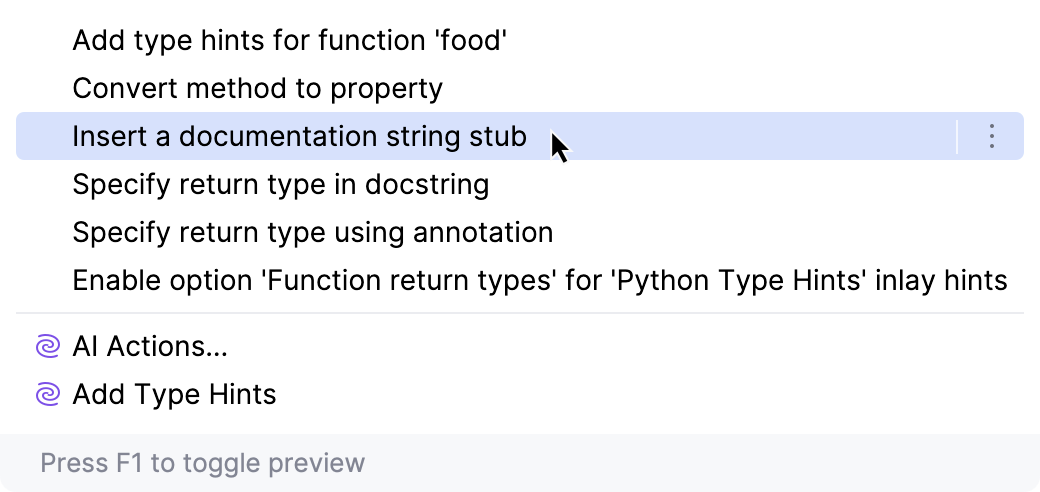
PyCharm generates documentation comment stub according to docstring format, selected in the Python Integrated Tools page.
Example of a Python documentation comment
Consider the following function:
Open settings Ctrl+Alt+S and navigate to .
In the Docstring format dropdown, select reStructuredText.
Then type the opening triple double-quotes and press Enter or Space. PyCharm generates a documentation comment stub in reStructuredText format:
You can use markup for text formatting, as well as substitutions, bulleted lists, links, code blocks, and tables.