Indexing and search
Air Context builds an embedding vector index of your codebase that AI agents can query by meaning. Indexing runs at scale, using an embedding backend on the Air Context server. Instead of searching for names of files, functions, or identifiers, you or your agent describe the intent or purpose of the code you're looking for, such as "where do we validate authentication tokens". Air Context matches the description against the embeddings of your indexed code and returns the locations.
How indexing works
Here is a simplified explanation of what happens to your code during indexing, storage, and retrieval.
Indexing is triggered. Indexing starts automatically or manually, as described in When indexing runs. It runs on a specific code snapshot, identified by a repository ID and a revision ID, as described in What you can index.
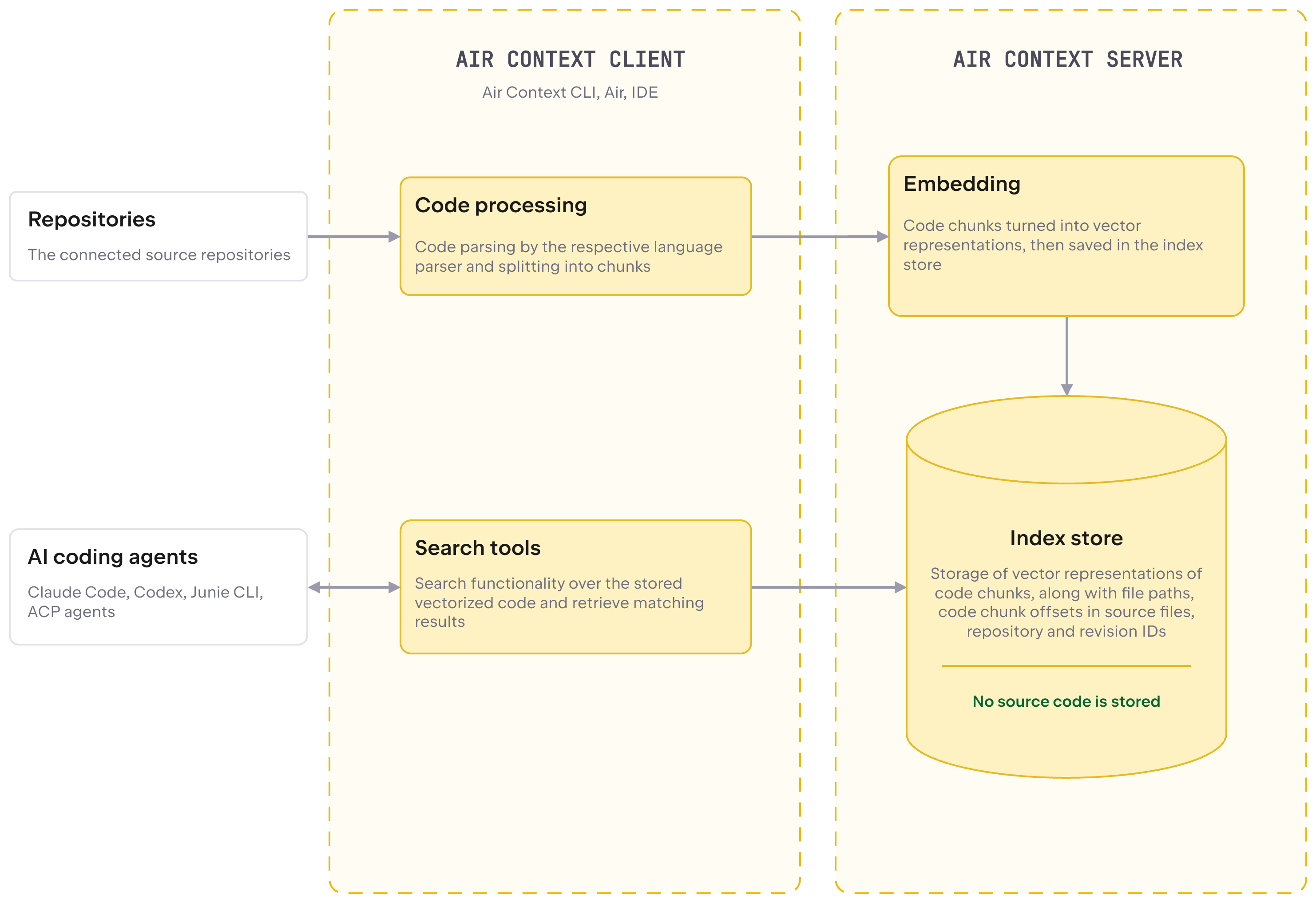
Code is processed. The client fetches and checks out the revision and groups files into a dataset of clusters for parallel, incremental indexing. Using dedicated language parsers, it splits files into code chunks (functions, classes, symbols, file-level docs) and attaches the file path and byte offsets to each chunk.
Chunks and accompanying data are sent to the server. Batches of code chunks are sent to the Air Context server, along with file paths and offsets.
The server computes embeddings and the index is stored. The Air Context server computes vector embeddings for the chunks. The embeddings and the index are stored on the Air Context server or, for small repositories indexed by users who aren't members of an organization in JetBrains Console, on your machine.
Search returns coordinates, not code. The server converts the query into a vector and returns the chunks whose vectors are closest to it. Search results are chunk IDs with the file path and offsets, not code. The agent or IDE then opens the actual code from your own checkout or storage, not from Air Context storage.
The following diagram gives a simplified view of the Air Context data flow, showing how the indexing, storage, and retrieval processes work together.
What you can index
Git repositories, identified by the remote URL and the indexed revision, which defaults to
HEAD.Non-Git folders, identified by a hash of the folder path and the host name.
For more information about these identifiers, see What is stored.
When indexing runs
Manually, with the
jbcontext indexcommand run in the project directory. When you work with a repository through the CLI and agent hooks, the first index is created this way.Automatically, through the session hooks that
jbcontext setup-agentinstalls, which refresh an existing index each time a configured agent starts a session and, depending on the agent, when it ends.In the background, in Air Teams, for connected repositories.
In CI, on a build agent with an organization service account. This is how large repositories are indexed. See Index repositories in CI.
In Air Governance, for the organization's GitHub repositories after an administrator connects to GitHub. An administrator can also block indexing for the whole organization, or block on-demand indexing (any run started by the CLI, including session hooks and CI). See Air Context indexing.
Indexing is incremental: only content that has changed since the last run is processed rather than the whole repository.
Exclude files from indexing
To keep parts of a repository out of the index, add a .jbcontextignore file. It uses .gitignore syntax, can be placed in any directory of the repository, and its patterns are relative to that directory. A .jbcontextignore file without patterns excludes the whole directory it's in; in the project root, it excludes the entire repository, and jbcontext index reports the skip and exits successfully.
Paths excluded by .gitignore, .aiignore, .aiexclude, .cursorignore, or .codeiumignore are also skipped. Changing a .jbcontextignore file makes the next indexing run process the repository in full.
How agents search
After you set up an agent with jbcontext setup-agent, it queries Air Context automatically instead of performing ad hoc searches and file reads. Depending on the installed components, an agent uses:
Skills, such as
context-search, which run thejbcontext searchcommand for the agent. Further skills, such ascontext-researchfor deeper codebase exploration, are available in the JetBrains/context repository.The exploration subagent (
context-explorer), which runs multiplejbcontext searchqueries in an isolated context and returns file and line references with code snippets.The MCP server, started with
jbcontext mcp, which exposes the semantic code search tool (code_search) over stdio.
For the full list of components and supported agents, see Agent integrations.
Search results are coordinates of relevant code, not the code itself. For more information, see How indexing works.
Search from the command line
You can also run the same command yourself from the terminal:
Options for narrowing the scope, such as --path-filter, --branch, and --limit, are listed in the CLI reference.
Monitor and manage indexes
Use the following commands to check the status of the index and remove indexes:
- jbcontext status
Reports the indexed snapshots of the current repository with their revisions and branches, whether the index is stored locally or on the Air Context server, and whether an ignore file excludes the repository.
- jbcontext stats
Opens a local dashboard of search, repository, and indexing activity.
- jbcontext remove-index
Removes your indexed snapshots of the current repository.
Indexed data stored on the Air Context server is retained for 14 days after it was last searched; searching resets this period. See Data retention.